文章目录
在阅读文章的时候,有个目录来导航,相信还是很方便阅读的,所以本站也弄了这么一块,特别是长点的文章,导航还是很有必要的,在 functions.php 中添加创建目录的函数,代码中的目录标签你要以自行定义,本站用的是 h3 标签:
// 文章内容添加文章目录function content_index($content) {
if(is_single()){
$matches = array();
$ul_li = '';
$r = "/<h3>([^<]+)<\/h3>/im";
$i='1';
if(preg_match_all($r, $content, $matches)) {
foreach($matches[1] as $num => $title) {
$content = str_replace($matches[0][$num], '<h3 id="title-'.$num.'">'.$title.'</h3>', $content);
$ul_li .= '<li><a class="smooth" href="#title-'.$num.'" title="'.$title.'">'.$i.'.'.$title."</a></li>\n";
$i ++;
}$content = "\n<div id=\"article-index\"><i class=\"fa fa-angle-double-right\" ></i><h4>目 录</h4>
<ul id=\"index-ul\">\n" . $ul_li . "</ul>
</div>\n" . $content;
}}return $content;
}add_filter( "the_content", "content_index", 13 );
js 代码
在 main.js 中添加以下代码,当点击目录时,能平滑移动到相应的位置,添加了一个样式:smooth
//锚点滑动:在href上加上一个样式:smooth$(".smooth").click(function(){
var href = $(this).attr("href");
var pos = $(href).offset().top-100;
$("html,body").animate({scrollTop: pos}, 1000);
return false;
});
添加样式
样式根据自己的网站风格设置就是。
#article-index {
position: fixed;
right: 66px;
bottom:0px;
padding: 10px;
border-radius: 5px;
z-index: 99999999;overflow:hidden;display:none;opacity:0
}#article-index i {
color: #fff;
font-size: 20px;
margin-right: 10px;
}#article-index i:hover{cursor:pointer}
#article-index h4 {
font-size: 16px;
color: #fff;
font-weight: 400;
margin: 0;
text-transform: uppercase;
position: relative;
text-align:center;display:inline-block
}#article-index ul {
margin: 10px auto 0;
padding: 10px;
max-height: calc(100vh - 178px);max-width:200px;
overflow-y: auto;overflow-x:hidden;
background: #fff;
}#article-index ul li {
list-style: none;
margin-bottom: 8px;
white-space: nowrap;
overflow: hidden;
text-overflow: ellipsis;
}#article-index ul li a{
font-size: 12px;}
添加目录
本站显示目录是放在右下侧导航上的,以下代码是显示目录与点击目录上隐藏按钮的 JS
//文章目录按钮$('#article-index i').click(function(){
$('#article-index').animate({'bottom':'0','opacity':'0'},600,function(){$(this).css('display','none')});
})
$('.wz-index').click(function(){
$('#article-index').css('display','block').animate({'bottom':'56px','opacity':'1'},600);
})
使用目录
要想在文章中能显示目录,在发表文章时,要含有目录标签,如本站的是 h3,那要写文章时,要有 h3 标签的标题。最终显示效果如下: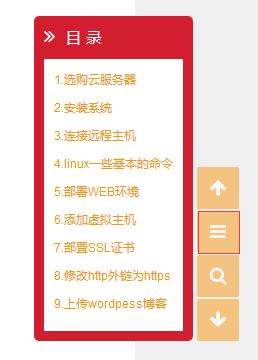
© 版权声明
文章版权归作者所有,未经允许请勿转载。
THE END
喜欢就支持以下吧