文章目录
据报,新浪博客已正式宣布“相册”功能下线,最后期限是 2019 年 7 月 31 日 24 时,又一个免费的午餐没了。如何把放在新浪相册的图片下载到本地并替换原来的链接,摆在了众多使用新浪免费图床用户面前,当然也包括我。经多方查找测试,将本人最终解决办法,分享给大家。wordpress 很多插件或者代码都可以实现在编辑文章中自动将外链图片下载到本地,最终我选择了一个叫:Easy Copy Paste的插件。
代码实现
也可以直接将下面的代码,添加到当前主题函数模板 functions.php 中:
function ecp_save_post($post_id, $post) {
global $wpdb;
if($post->post_status == 'publish') {
$p = '/<img.*[\s]src=[\"|\'](.*)[\"|\'].*>/iU';
$num = preg_match_all($p, $post->post_content, $matches);
if ($num) {
$wp_upload_dir = wp_upload_dir();
set_time_limit(0);
$ch = curl_init();
curl_setopt($ch, CURLOPT_HEADER, false);
curl_setopt($ch, CURLOPT_RETURNTRANSFER, true);
curl_setopt($ch, CURLOPT_SSL_VERIFYPEER, false);
curl_setopt($ch, CURLOPT_FOLLOWLOCATION, true);
curl_setopt($ch, CURLOPT_MAXREDIRS,20);
curl_setopt($ch, CURLOPT_CONNECTTIMEOUT, 30);
$ecp_options = $_SERVER['HTTP_HOST'];
foreach ($matches[1] as $src) {
if (isset($src) && strpos($src, $ecp_options) === false) {
$file_info = wp_check_filetype(basename($src), null);
if ($file_info['ext'] == false) {
date_default_timezone_set('PRC');
$file_name = date('YmdHis-').dechex(mt_rand(100000, 999999)).'.tmp';
} else {
$file_name = dechex(mt_rand(100000, 999999)) . '-' . basename($src);
}curl_setopt($ch, CURLOPT_URL, $src);
$file_path = $wp_upload_dir['path'] . '/' . $file_name;
$img = fopen($file_path, 'wb');
curl_setopt($ch, CURLOPT_FILE, $img);
$img_data = curl_exec($ch);
fclose($img);
if (file_exists($file_path) && filesize($file_path) > 0) {
$t = curl_getinfo($ch, CURLINFO_CONTENT_TYPE);
$arr = explode('/', $t);
if (pathinfo($file_path, PATHINFO_EXTENSION) == 'tmp') {
$file_path = ecp_handle_ext($file_path, $arr[1], $wp_upload_dir['path'], $file_name, 'tmp');
} elseif (pathinfo($file_path, PATHINFO_EXTENSION) == 'webp') {
$file_path = ecp_handle_ext($file_path, $arr[1], $wp_upload_dir['path'], $file_name, 'webp');
}$post->post_content = str_replace($src, $wp_upload_dir['url'] . '/' . basename($file_path), $post->post_content);
$attachment = ecp_get_attachment_post(basename($file_path), $wp_upload_dir['url'] . '/' . basename($file_path));
$attach_id = wp_insert_attachment($attachment, ltrim($wp_upload_dir['subdir'] . '/' . basename($file_path), '/'), 0);
$attach_data = wp_generate_attachment_metadata($attach_id, $file_path);
$ss = wp_update_attachment_metadata($attach_id, $attach_data);
}}}curl_close($ch);
$wpdb->update( $wpdb->posts, array('post_content' => $post->post_content), array('ID' => $post->ID));
}}}function ecp_handle_ext($file, $type, $file_dir, $file_name, $ext) {
switch ($ext) {
case 'tmp':
if (rename($file, str_replace('tmp', $type, $file))) {
if ('webp' == $type) {
return ecp_image_convert('webp', 'jpeg', $file_dir . '/' . str_replace('tmp', $type, $file_name));
}return $file_dir . '/' . str_replace('tmp', $type, $file_name);
}case 'webp':
if ('webp' == $type) {
return ecp_image_convert('webp', 'jpeg', $file);
} else {
if (rename($file, str_replace('webp', $type, $file))) {
return $file_dir . '/' . str_replace('webp', $type, $file_name);
}}default:
return $file;
}}function ecp_image_convert($from='webp', $to='jpeg', $image) {
$im = imagecreatefromwebp($image);
if (imagejpeg($im, str_replace('webp', 'jpeg', $image), 100)) {
try {unlink($image);
} catch (Exception $e) {
$error_msg = sprintf('Error removing local file %s: %s', $image,
$e->getMessage());
error_log($error_msg);
}}imagedestroy($im);
return str_replace('webp', 'jpeg', $image);
}function ecp_get_attachment_post($filename, $url) {
$file_info = wp_check_filetype($filename, null);
return array(
'guid' => $url,
'post_type' => 'attachement',
'post_mime_type' => $file_info['type'],
'post_title' => preg_replace('/\.[^.]+$/', '', $filename),
'post_content' => '',
'post_status' => 'inherit'
);
}add_action('save_post', 'ecp_save_post', 120, 2);
单篇操作
之后,编辑文章只需要点击更新按钮,就可以将文章中的外链图片下载到本地并替换链接。不过逐个编辑文章不仅繁琐而且工作量不小,这里教大家一个小技巧,可以批量下载文章中的外链图片。该插件的代码不仅可以在正常的编辑页面点击更新按钮触发下载功能,而且可以在后台所有文章列表页面中触发下载图片功能,原理明白了,操作就简单了。
批量操作
进入 WP 后台,文章→所有文章,进入文章管理页面,勾选“标题”全选当前页面的所有文章,并选择“编辑”,并点击“应用”按钮。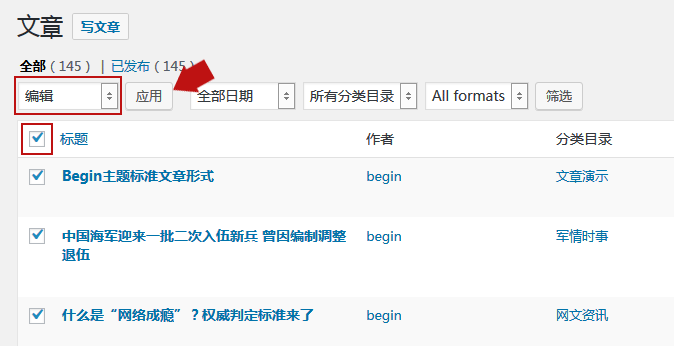
切记,不要更改批量编辑中的任何设置,只需单击 “更新”即可。这个过程将触发检查所有选定的文章,并导入外链图片。默认每页只显示 20 篇文章,如果你的文章较多,并想一次性处理更多的文章,可以打开右上角的“显示选项”,将“每页的项目数”调整为 9999,当然要视你的主机配置适当调整文章数量,一次性处理太多文章,会让主机瞬间资源耗尽,造成宕机。
提示:操作前请提前做好数据库备份,以防万一,祝大家图片逃亡成功!
© 版权声明
文章版权归作者所有,未经允许请勿转载。
THE END
喜欢就支持以下吧